6 min to read
Tables
In the earlier days of the web, tables were also used to layout webpages
| Tag | Description | Syntax |
|---|---|---|
<b> |
bold text | <b>bold text</b> |
<strong> |
Important text | <strong>Important text</strong> |
<i> |
italic text | <i>italic text</i> |
<u> |
underlined text | <u>underlined text</u> |
<em> |
Emphasized text | <em>Emphasized text</em> |
<mark> |
Marked text | <mark>Marked text</mark> |
<small> |
Small text | <small>Small text</small> |
<del> |
<del>Deleted text</del> |
|
<ins> |
Inserted text | <ins>Inserted text</ins> |
<sub> |
Subscript text | <sub>Subscript text</sub> |
<sup> |
Superscript text | <sup>Superscript text</sup> |
Tables provide a friendly visual manner of representing data.
In the earlier days of the web, tables were also used to layout webpages. Dividing a webpage into header, navigation, sidebar, footer, main content and many other parts was done with the help of tables.
However, now layout should be made with css utilities such as grid and flexbox. Html’s original purpose was just to markup text and that’s what it should be used for. For design purposes CSS is the best convention.
Define a table
<table> tag is used to define tables in html.
Rows of a table are defined with the <tr> tag.
A column of a table is specified using the <td> element.
For the columns of the table header use <th> instead of <td>.
A table is divided into two parts.
- thead
- tbody
thead
<thead> defines the table header.
It’s primarily used for naming of the table columns.
tbody
<tbody> specifies all the content of the table.
Example
<!DOCTYPE html>
<html>
  <head>
    <title>My title</title>
    <meta charset="UTF-8" />
    <style>
      table,
      th,
      td {
        border: 1px solid black;
      }
    </style>
  </head>
  <body>
    <table>
      <thead>
        <tr>
          <th>Movie</th>
          <th>Villain</th>
          <th>Review</th>
        </tr>
      </thead>
      <tbody>
        <tr>
          <td>Avengers: Infinty War</td>
          <td>Thanos</td>
          <td>Dying in suspense</td>
        </tr>
        <tr>
          <td>Avengers: Endgame</td>
          <td>Fucking Thanos Again</td>
          <td>Sad ;(</td>
        </tr>
      </tbody>
    </table>
  </body>
</html>
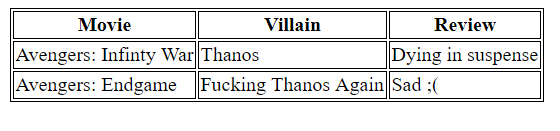
In the above example we specified border for our table using css.
<style>
  table,
  th,
  td {
    border: 1px solid black;
  }
</style>
Note: Do not forget to define borders for the table as well as the table cells.
Collapse border
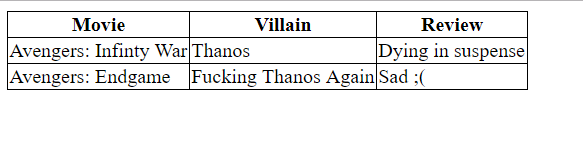
The borders in the above example looks ugly and too old.
We can collapse the border to make it pleasant.
<style>
  table,
  th,
  td {
    border: 1px solid black;
    border-collapse: collapse;
  }
</style>
Cell Padding
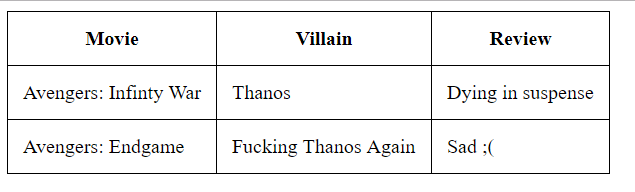
Space between the cell content & borders is known as cell padding.
Css paddingproperty can set cell-padding for a table.
<style>
  th,
  td {
    padding: 12px;
  }
</style>
Border Spacing
We can also give space between the table cells using the border-spacing css property on the table.
<style>
  table {
    border-spacing: 10px;
  }
</style>
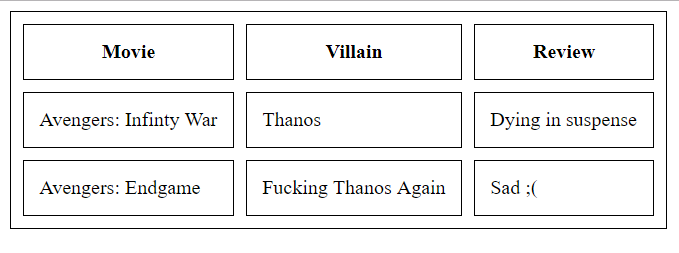
Note: border spacing won’t work with collapsed borders.
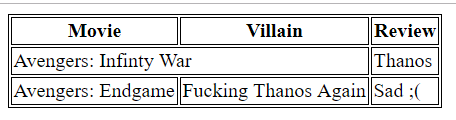
colspan
We can make some cell span across multiple columns using the colspan property.
<!DOCTYPE html>
<html>
  <head>
    <title>My title</title>
    <meta charset="UTF-8" />
    <style>
      table,
      th,
      td {
        border: 1px solid black;
      }
    </style>
  </head>
  <body>
    <table>
      <thead>
        <tr>
          <th>Movie</th>
          <th>Villain</th>
          <th>Review</th>
        </tr>
      </thead>
      <tbody>
        <tr>
          <td colspan="2">Avengers: Infinty War</td>
          <td>Thanos</td>
        </tr>
        <tr>
          <td>Avengers: Endgame</td>
          <td>Fucking Thanos Again</td>
          <td>Sad ;(</td>
        </tr>
      </tbody>
    </table>
  </body>
</html>
rowspan
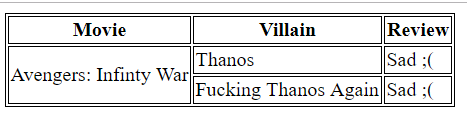
We can make some cell span across multiple rows using the rowspan property.
<!DOCTYPE html>
<html>
  <head>
    <title>My title</title>
    <meta charset="UTF-8" />
    <style>
      table,
      th,
      td {
        border: 1px solid black;
      }
    </style>
  </head>
  <body>
    <table>
      <thead>
        <tr>
          <th>Movie</th>
          <th>Villain</th>
          <th>Review</th>
        </tr>
      </thead>
      <tbody>
        <tr>
          <td rowspan="2">Avengers: Infinty War</td>
          <td>Thanos</td>
          <td>Sad ;(</td>
        </tr>
        <tr>
          <td>Fucking Thanos Again</td>
          <td>Sad ;(</td>
        </tr>
      </tbody>
    </table>
  </body>
</html>
Caption
Tables can be captioned using the <caption> tag.
<table>
  <caption>
    Monthly savings
  </caption>
  <thead>
    <tr>
      <th>Movie</th>
      <th>Villain</th>
      <th>Review</th>
    </tr>
  </thead>
  <tbody>
    <tr>
      <td rowspan="2">Avengers: Infinty War</td>
      <td>Thanos</td>
      <td>Sad ;(</td>
    </tr>
    <tr>
      <td>Fucking Thanos Again</td>
      <td>Sad ;(</td>
    </tr>
  </tbody>
</table>
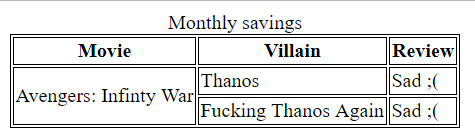
Note: caption comes just after the opening table tag





Comments